Security Intelligence
On November 12, 2026, Microsoft reported a suite-wide Microsoft 365 service degradation that began at 18:26 UTC. Exchange Online email was at the center of the disruption, with knock-on effects for Outlook, calendar features, and some Teams tasks. Within about an hour, Downdetector received reports from 74 countries and territories.
Microsoft attributed the outage to an unexpected failure that left several servers unavailable and placed extra strain on the remaining infrastructure. The underlying cause is still under investigation, though Microsoft has found no evidence of malicious activity. The outage affected businesses, public sector organizations, and connected services.
Outage-themed lures have circulated since then. Warnings about fake Outlook password reset emails and texts appeared within hours on November 12. The next day, Australia's National Cyber Security Coordinator urged users to stay vigilant and treat unsolicited contact with caution. The Royal Dutch Pharmacists Association also warned of phishing emails offering account recovery, multi-factor authentication (MFA) settings changes, and Microsoft updates. Another phishing email posing as a Microsoft 365 notice claimed inactive accounts were being deactivated and asked recipients to verify through a button.
Researchers also warned of payment redirection: a threat actor poses as a manager or supplier, says their email is down, and asks by text for a payment to a new account. Another report stated that threat actors use the outage to impersonate Microsoft support, send fake password reset links, and offer refunds to users waiting for email to return. The same report noted the outage was unresolved as of Friday, November 13.
The pattern is not new. During the 2024 CrowdStrike outage, threat actors sent malware disguised as software that would fix the problem.
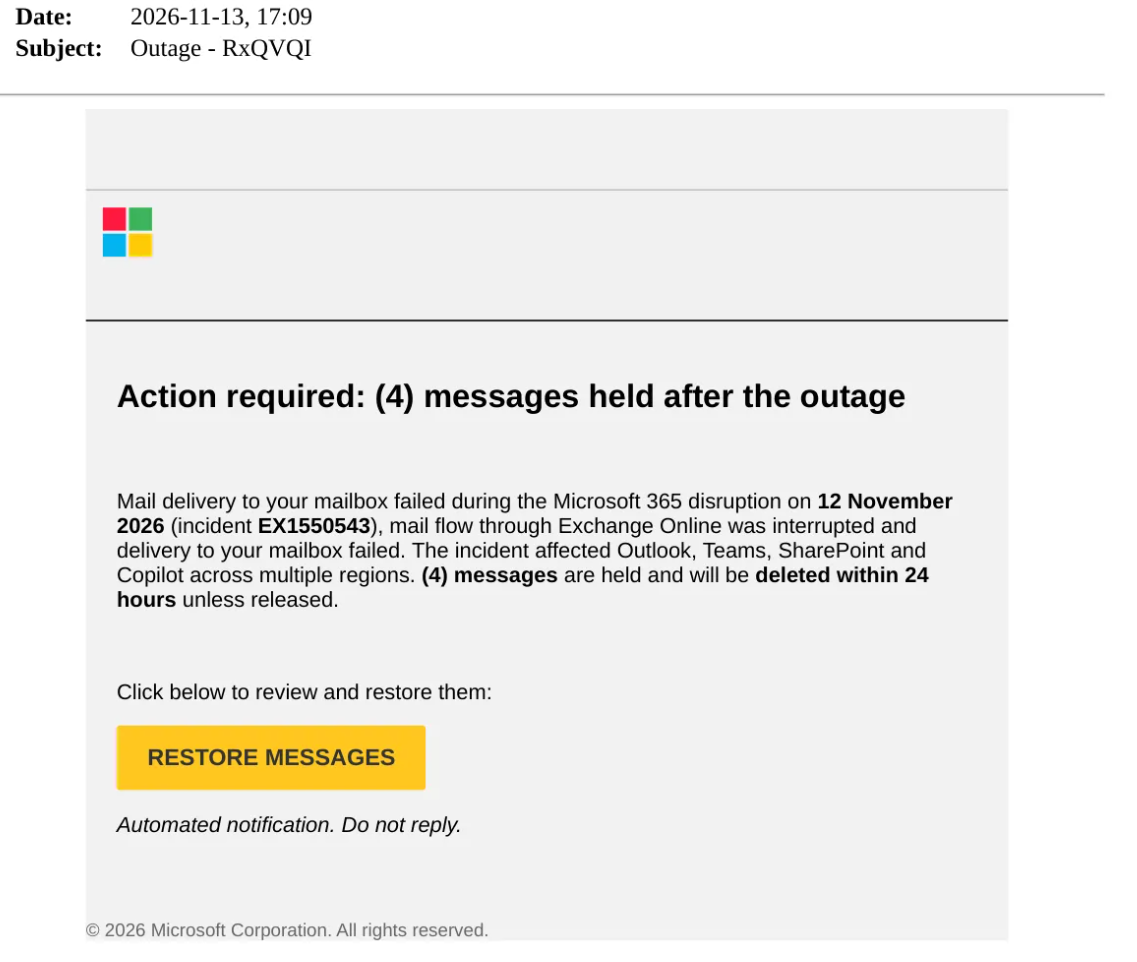
On November 13, 2026, Field Effect’s Suspicious Email Analysis Service (SEAS) detected a credential phishing email that impersonates a Microsoft notification. This is one lure among several outage-themed variants.
The subject line follows the pattern "Outage - " plus a random six-character string.
The email claims four messages are held after the outage and threatens deletion within 24 hours, copying the format of Microsoft quarantine digests, which list held messages and let users release them.
Incident ID EX1550543 is cited, which matches the ID reported for Microsoft's Exchange Online incident, giving the lure a real detail that lends it legitimacy.
A "RESTORE MESSAGES" button leads to a credential harvesting page.
The same text has been reported at other organizations, which indicates a distributed campaign.
Here's a sample:
This campaign relies on social engineering, specifically credential phishing and technical support fraud, aimed at Microsoft users who lost email and are waiting for recovery messages. Finance staff, executives and helpdesk teams likely carry the most risk because their accounts control payments, sensitive data and password resets.
Threat actors already favor Microsoft themes. Microsoft is the most impersonated brand, accounting for 33% of brand phishing attempts in the third quarter of 2026. The outage adds a real event and a reason to act fast, and the theme works because it matches what users are already waiting for. Restoring mail, verifying an account, re-enrolling MFA, or speaking to support are all steps a user might plausibly take after an outage, and each has a fraudulent version.
Each lure depends on a user interaction: entering a password, approving an MFA prompt, reading out a code, or allowing a remote session. Phishing-resistant MFA, callback verification and limits on remote support tools each remove one of those steps from the threat actor’s reach, even when a user is tricked.
Several variants operate outside common controls. Phone calls and Teams messages bypass email filtering, and scammers often switch to calls when email is down and may keep posing as technical support after services return. Remote support sessions started through tools such as Quick Assist are explicitly authorized by the user, which reduces security alerts.
During the outage, many security teams also lost access to Microsoft Defender XDR and to alerts delivered through Outlook. Researchers have seen scam campaigns emerge within hours of major outages at Microsoft, Google, and Amazon Web Services, and Microsoft has separately warned that threat actors increasingly impersonate helpdesk staff through external Teams contact to obtain remote access.
Persistence is a key risk. A password reset closes the original access path but leaves anything the threat actor created with stolen credentials: inbox rules, mailbox forwarding, OAuth app consents and newly registered MFA methods all remain active until removed.
Business email compromise is also a concern. Where MFA uses codes or push approvals, a captured password and code gives the threat actor mailbox access. From there, a forwarding rule can redirect supplier invoices, and a trusted internal mailbox can phish colleagues and clients. A payment redirection request is more convincing this week because recipients know email really was down. A fake support call that ends with remote access software installed gives the threat actor hands-on access to the device, and a compromised administrator account extends that reach across the tenant.
Identify recipients by searching message trace and Microsoft Defender Threat Explorer for messages that reference the outage alongside restore, verify, password reset, MFA or refund language and a link, then purge matches and block the related senders, domains and links.
Review Microsoft Entra ID sign-in and audit logs beginning November 12, 2026 for each user who interacted with a lure, focusing on new sign-in locations, OAuth consent grants and MFA method registrations, and review inbox rule and forwarding creation in the Microsoft Purview unified audit log. Remove unauthorized rules, consents and authentication methods, then reset passwords and revoke sessions and tokens. Entra sign-in and audit logs are kept for 30 or 90 days depending on licensing, so export logs covering the outage window to preserve evidence.
Limit Microsoft Teams external access to trusted domains, and limit Quick Assist and other remote support tools to authorized IT staff to close the fake support route. Monitor for unexpected Quick Assist sessions and for PowerShell or remote management activity following a support session. Verify password resets, MFA changes and payment or banking changes requested during and after the outage by calling the requester back on a known number.
Remind users that Microsoft posts outage updates only on the Microsoft 365 admin center Service health page, and that genuine quarantine digests come from quarantine@messaging.microsoft.com with the subject “Microsoft 365 security: You have messages in quarantine.”
Review remote access tool installations since November 12 to detect successful fake support calls. Monitor sign-ins from new locations and new inbox rules through the recovery period to catch account misuse early.
Sign up to receive a weekly roundup of our security intelligence feed. You'll be the first to know of emerging attack vectors, threats, and vulnerabilities.