Blog Post
Few cyberattacks today start with a sophisticated exploit. More often than not, they actually begin with a simple misconfiguration:
Multi-factor authentication (MFA) that isn't consistently enforced
A legacy sign-in method still switched on
A consent setting left wide open
That’s exactly what Field Effect’s Cloud Tenant Risk Score is built to solve. Available as part of Field Effect MDR, it’s a new way to see, understand, and strengthen the security posture of Microsoft 365 environments, helping organizations find and fix misconfigurations before attackers do.
You can't stop attacks that you can’t see.
Every blind spot is a place an attacker can go unnoticed, which is why Field Effect's approach starts with full visibility: understanding your environment and risk, eliminating as much risk as possible to reduce the attack surface, and disrupting threats fast when they do occur.
This approach is only getting more urgent. AI is giving attackers faster, easier ways to find and exploit gaps in an organization's defenses, shrinking the window between a misconfiguration existing and an attacker finding it.
Left unmanaged, a minor misconfiguration can quickly open the door for attackers.
Push-based MFA is fast and convenient, but an attacker who already has stolen credentials can trigger the same approval prompt repeatedly, betting the user taps "Approve" just to make those notifications stop.
Turning on number matching closes that gap. Instead of one tap, the user has to enter a number shown on their sign-in screen and confirm the app, location, and device requesting access.
That extra step forces a real check instead of a reflex tap, so a barrage of prompts from an attacker gets ignored instead of approved.
By default, any employee can grant a third-party app access to company mail, files, and Microsoft Teams in one click and without any additional approval.
Attackers exploit this with consent phishing: a disguised app (a "document viewer," an "Office upgrade") requests permission, and one approval hands over a working access token. No password required, and that access survives a reset.
Blocking user consent removes that one-click loophole. Employees can no longer approve app permissions themselves, so every request routes to IT for review first. A phishing email asking for a click is harmless if the click alone can't grant access.
Device code sign-in exists for devices without a browser, like a smart TV. It works by generating a code that the user enters on a separate device to complete login. Attackers abuse this by generating their own code, then sending it to a victim disguised as something routine, like a meeting invite.
Because the link goes to Microsoft's real login page, it looks completely legitimate. But when the victim enters the code and signs in, they're not authenticating their own device; they're unknowingly approving the attacker's session, handing over a valid access token.
Blocking device code flow for untrusted apps shuts that path down. The sign-in method only works for a pre-approved list of trusted apps, so a phishing link built around an unapproved app never completes, no matter how convincing it looks.
Each of these fixes is simple on its own. The hard part is knowing when they're needed. Security settings might be configured correctly at setup, but they don't stay that way on their own. A once-strong policy gets loosened for convenience, a new app gets granted access, a legacy protocol never gets switched off.
Without ongoing visibility, that drift goes unnoticed until an attacker finds it. That's where Field Effect's Cloud Tenant Risk Score comes in.
Field Effect's Cloud Tenant Risk Score gives you continuous visibility into the security posture of your Microsoft 365 environment, so you can monitor and track the associated risk and identify when your tenants have gaps that need mitigating.
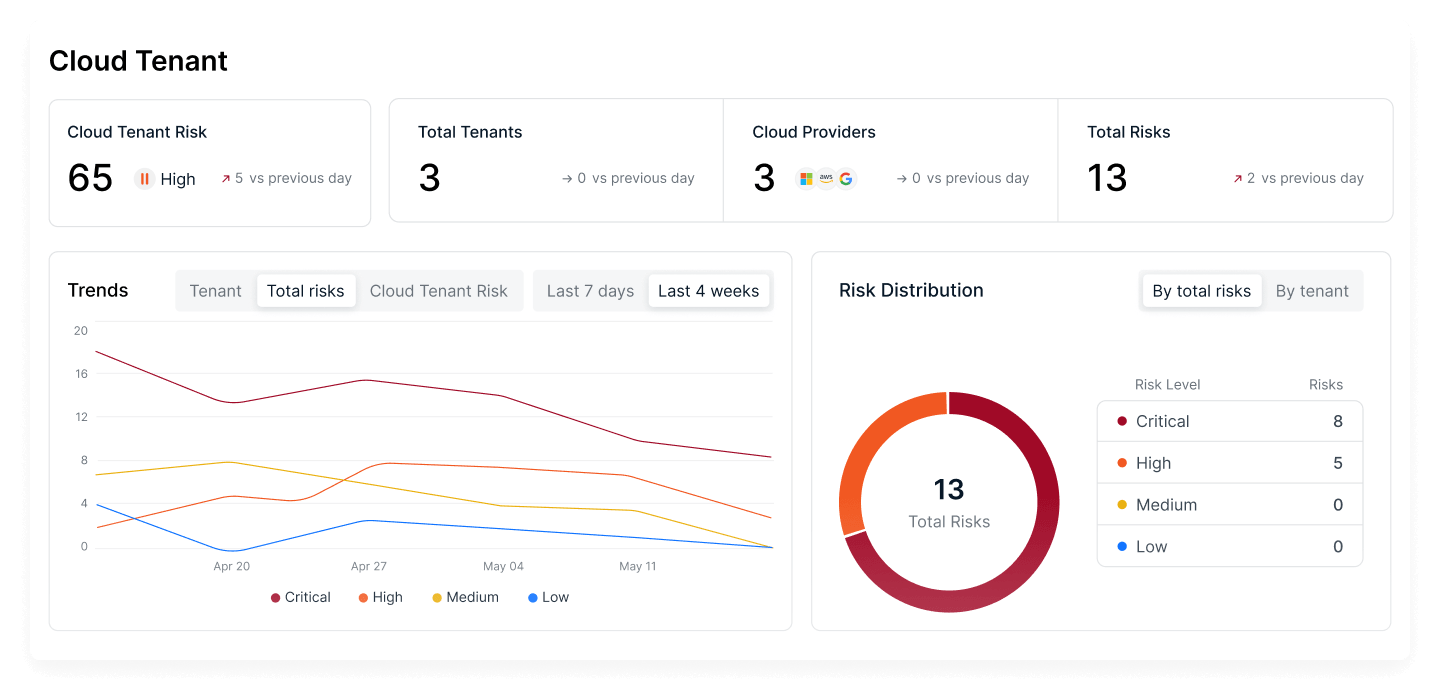
Image 1: Cloud Tenant Risk Score dashboard
The tenant risk score recommends policy settings to proactively strengthen your security posture and flags when policy settings drift, so no vulnerability goes unnoticed.
Every risk we surface is grounded in frontline knowledge of how attackers actually operate and industry best practices, so you're not just closing gaps, you're closing the ones attackers are most likely to exploit.
Here's how Field Effect's Cloud Tenant Risk Score keeps your Microsoft 365 environment from drifting out of a secure state:
With Field Effect Cloud Tenant Risk Score, you can focus your efforts on stopping attacks before they happen. And if an attacker does find a way in, Field Effect MDR is watching the same environment around the clock, ready to investigate, locate, and block threats fast.
Cloud Tenant Risk Score is now included with any Field Effect MDR package that includes cloud security, at no additional cost.
Book a demo to see how Field Effect can help protect your organization.